


Need to know your resume's ATS score? Most job seekers do — and it matters more than you might think. The numbers tell a shocking story: ATS filters block 75% of resumes before human recruiters see them. Your application has only a one-in-four chance of reaching human eyes.
The landscape has changed dramatically. ATS software now powers the recruitment process at more than 98% of Fortune 500 companies. These systems scan every resume for specific keywords, proper formatting, and file compatibility. Many candidates worry about their resume's ATS friendliness without knowing how to verify it. Making sure your resume works with ATS systems is vital to succeed in today's job market.
Good news - you have several reliable ways to verify your resume's ATS compatibility. This piece walks you through 7 proven methods to assess how your resume performs with Applicant Tracking Systems. You'll learn the quickest way to fix problems that might send your applications into the digital void.
Use an ATS Resume Scanner Tool
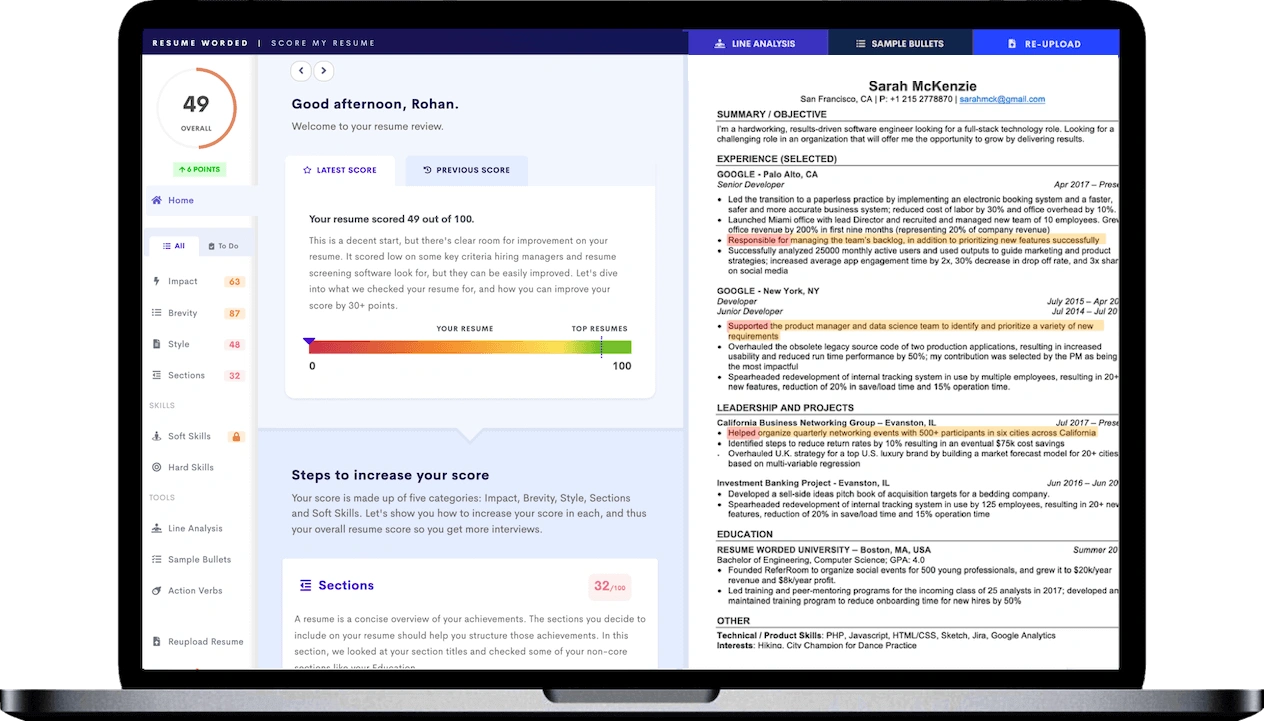
Image Source: Resume Worded
The best way to check your "how to check ATS score of resume" is to use specialized scanning tools. These tools give you quick feedback on how well your resume works with applicant tracking systems and point out any problems that might keep your application from reaching real people.
What is an ATS resume scanner
An ATS resume scanner is software that shows how well your resume performs when employer applicant tracking systems process it. These scanners are different from regular resume review services because they mirror how an ATS reads, interprets, and scores your document.
These scanners help determine if your resume has the right keywords, proper formatting, and clear structure that ATS software can read correctly. On top of that, many tools look beyond simple ATS compatibility to give you a full picture of your content quality, section completeness, and overall resume strength.
These scanners serve as your first line of defense and help you spot potential problems before an employer's system rejects your resume. Most big companies use ATS to filter applications, so checking "is my resume ATS friendly" has become a vital part of applying for jobs.
How ATS resume scanners work
ATS resume scanners break down your resume's content into different categories and analyze each part against specific criteria. The scanner processes your document just like an employer's ATS would.
The scanner starts by looking at your resume's structure and formatting to make sure it's readable. It spots formatting issues that might confuse an ATS, such as complex layouts, unusual fonts, or problematic elements like headers, footers, tables, and graphics.
The tools then compare your keyword usage against industry standards or specific job descriptions. You'll see which keywords you're missing that might be important for your target position, with a focus on hard skills, soft skills, job titles, and education requirements.
Most scanners also give you an overall "score" or compatibility rating based on:
- Keyword relevance and density
- Proper section headings and organization
- File type compatibility
- Overall formatting and readability
- Skills section completeness
A good ATS score is usually 80% or higher, which shows your resume lines up well with job requirements and has a better chance of reaching a hiring manager.
Best free tools to check ATS score
Here are some reliable free tools to help you check if your resume is ATS friendly:
Jobscan - This tool stands out as one of the best ATS resume checkers you can find. It matches your resume against job descriptions and gives you a percentage based on keywords, skills, job titles, and education. Jobscan tests your resume against major ATS systems like iCIMS, Recruiterbox, Lever, Greenhouse, and Taleo.
Career.io - Their free resume review tool reveals exactly what applicant tracking systems see in your resume. You'll also get tips to improve your content, formatting, and overall presentation.
TopResume - They offer a free ATS scan that looks at both content quality and ATS compatibility. The service converts your resume to plain text to find potential parsing issues.
Enhancv - Their detailed ATS check looks at your skills, keywords, contact details, file type, and document length. The scanner also checks if your sections are complete and finds any vague wording.
MyPerfectResume - You get a free ATS checker that looks at structure and wording, then gives you steps to improve with a personal report and resume strength score.
Try running your resume through several scanners to get the best results, since each tool uses different methods to review your resume. This gives you a better understanding of how your resume works with different ATS systems.
Using these tools regularly while job hunting can substantially boost your chances of getting past automated screening and landing more interviews.
Check Resume Formatting for ATS Compatibility
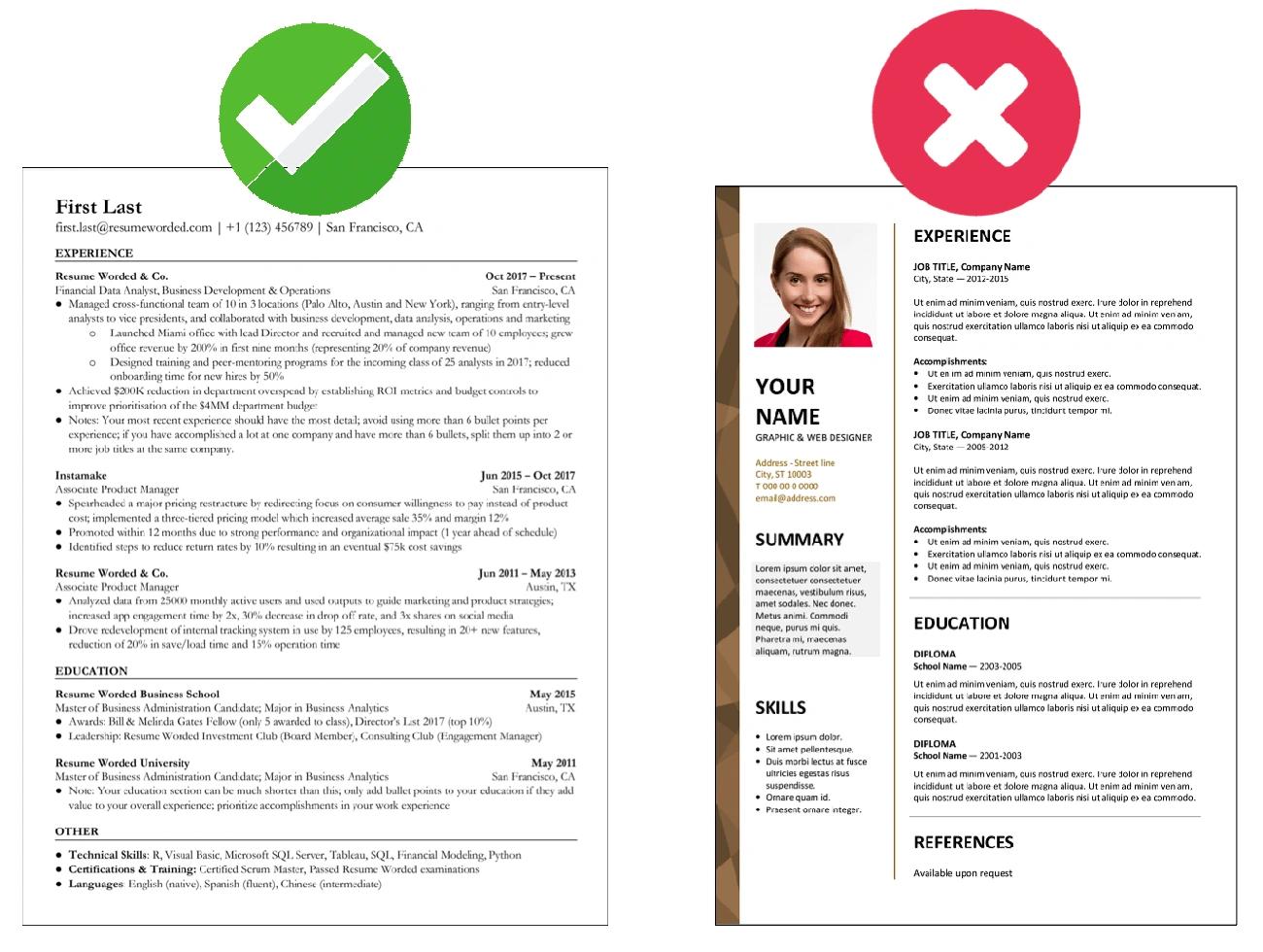
Image Source: Resume Worded
The next step after running your resume through scanner tools is to dissect its formatting—maybe the most vital element for ATS compatibility. Your resume might get rejected despite perfect qualifications because formatting problems prevent proper parsing.
Why formatting affects ATS score
ATS software scans and parses text instead of "seeing" your resume like humans do. These systems pull specific information from your document to categorize and rank your application.
We searched for recognizable patterns and structures. Your resume won't work well when it uses complex formatting because the software can't tell where sections begin and end. Studies show that 75% of qualified candidates don't make it through just because of readability issues from poor formatting.
On top of that, most ATS programs look at just the main body content and skip information in headers or footers. Your contact details might never reach recruiters if you put them in the wrong spot.
The software creates a "parsed" version of your resume that hiring managers see first—and it might look nothing like your carefully designed document. The way you format directly shapes how your qualifications appear to decision-makers.
Common formatting issues to fix
Your ATS score will improve when you fix these formatting problems:
Complex design elements - ATS systems can't "read" graphics, tables, columns, text boxes, and images. The system either ignores them or messes up your text layout.
Headers and footers - ATS systems usually miss important information in these areas. Put your essential details in the main body.
Non-standard fonts - Unusual or decorative fonts can turn into special characters or symbols during parsing. Use standard fonts like Arial, Calibri, Times New Roman, or Garamond at 10-12 point size.
Creative section titles - The ATS gets confused when you use titles like "Professional Experience" instead of standard headings like "Work Experience".
File type incompatibility - Some ATS systems don't handle certain file formats well. PDF works fine, but .docx is often safer unless told otherwise.
Inconsistent date formats - The ATS might calculate employment duration wrong if you mix up date formats throughout your resume.
Improper spacing and margins - The parser struggles with dense text or uneven spacing. Keep 1-inch margins and proper line spacing (1.0-1.15).
Acronyms without explanation - Your keyword match score drops when you use industry acronyms without spelling them out first. Write both versions: "Search Engine Optimization (SEO)."
How to check if resume is ATS friendly
You can use several methods to test if your resume works with ATS:
- Plain text test - Open your resume as a plain text (.txt) file and look it over. This removes formatting to show what an ATS might "see." Look for:
- Missing information
- Text in wrong order
- Strange characters or symbols
- Sections running together
- Format verification - Check your resume against these ATS-friendly rules:
- Simple, chronological or hybrid format
- Standard section headings (Work Experience, Education, Skills)
- No tables, columns, or graphics
- Black text in standard fonts (10-12pt)
- PDF or .docx file format
- Visual inspection - Ask yourself:
- Can I highlight all text (not stuck in graphics)?
- Do section headings stand out clearly?
- Does information flow logically?
- Does readability come before visual appeal?
- Format-specific ATS checkers - Tools like Jobscan's resume scanner point out formatting mistakes that might stop proper ATS parsing.
These formatting best practices will substantially boost your resume's chances of getting through ATS filters and reaching human reviewers who can see your true qualifications.
Analyze Keyword Match with Job Description
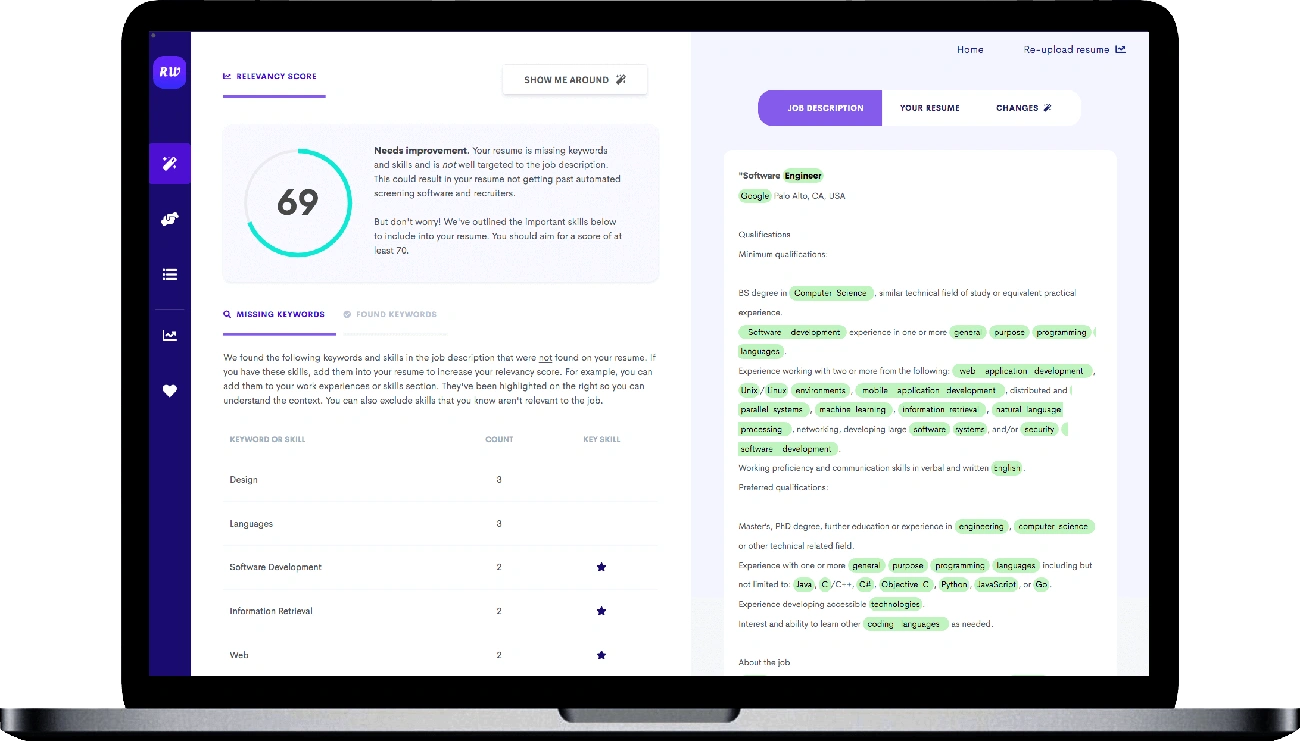
Image Source: Resume Worded
Beyond proper formatting, keyword optimization is the life-blood of achieving a high ATS score. Harvard Business School research shows that 88% of employers admit their hiring systems filter out qualified candidates who don't precisely match the job description. This makes keyword matching the most critical factor that determines if your resume reaches human eyes.
Importance of keyword optimization
Keywords bridge your qualifications with employer requirements. These specific terms and phrases help ATS software evaluate your resume. A study by Jobscan revealed that 99.7% of recruiters use filters in their ATS or similar systems to find qualified candidates.
Your resume gets eliminated for a simple reason: the ATS doesn't see a match between your qualifications and job requirements. Companies use these keyword matches as their original screening tool.
Most job seekers don't realize how precisely ATS systems match terms. These systems look for exact word matches instead of conceptual similarities. Even the most qualified candidates can face rejection just because they described their skills differently.
How to identify missing keywords
The quickest way to identify the right keywords is to follow this approach:
- Read the job description really well - This seems obvious, but in spite of that, candidates often miss reviewing the entire posting. You need to get into every section and focus on qualifications, responsibilities, and required skills.
- Look for repeated terms and phrases - The ATS filtering process gives more weight to words or phrases that appear multiple times. These repetitions point to core requirements.
- Focus on multi-word phrases - ATS gives higher scores to exact matches on short phrases than single words. Examples include "cross-functional collaboration," "process improvement," and "data analysis".
- Categorize keywords by type:
- Hard skills (technical abilities)
- Soft skills (interpersonal qualities)
- Industry-specific terminology
- Required qualifications/education
- Action verbs from responsibilities section
- Note standard section headings - Common resume section headings like "Education," "Work Experience," and "Skills" work as keywords too.
Jobscan data reveals that candidates who include the exact job title on their resume are 10.6 times more likely to get an interview.
Tools to compare resume with job description
These specialized tools can help analyze keyword matches between your resume and job descriptions:
Jobscan - This complete tool analyzes your resume against specific job descriptions. It calculates a match percentage based on keywords, hard skills, education, job titles, and soft skills. You need a match rate of at least 75% to get optimal results.
Resume Worded - This tool spots important keywords and marks them with a star indicator based on machine learning algorithms. It also suggests natural ways to add these keywords to your resume.
SkillSyncer - This tool analyzes thousands of job descriptions to find the best keywords for your target position. Its scoring system helps you choose which terms to add first.
JobScan Resume Matcher - You can learn about keyword alignment, missing skills, and get prioritized improvement suggestions. The tool aims for a score of 75% or higher.
Resume Job Description Match - This tool compares your resume with specific postings. It gives a match score from 0-100% by analyzing keywords, skills, and experience requirements.
Note that you should use keywords naturally throughout your document instead of listing them. A Jobscan user shared, "I went from not getting interviews for months at a time and then I got three or four interviews. It was a definite change".
Evaluate File Type and Structure
Image Source: Resume Worded
The file type you choose for your resume might seem trivial, but it can determine whether you pass the ATS evaluation. A perfectly formatted resume with the right keywords might get rejected just because you saved it in the wrong format.
ATS-friendly file formats
ATS systems don't treat all file formats equally. Experts still debate about the best format, though they agree on certain options.
Word documents (.doc or .docx) are the safest bet for ATS compatibility. These formats work with almost every ATS program and keep your content structure intact. Most recruiters suggest using Word formats unless the job posting says otherwise.
PDFs can work well with ATS—with a few catches. Modern ATS systems can read PDFs exported from Microsoft Word or Google Docs. The biggest problem comes from scanned PDFs or ones with complex design elements.
Here's what you need to know: some sources say PDFs work everywhere, while others point out certain ATS programs can't read them. This happens because companies use different ATS software. To stay safe, follow these rules:
- Pick .doc or .docx when no file type is mentioned
- Use PDFs only when the job posting allows them
- Stay away from unusual file types like .rtf, .jpg or Google Docs links
- Don't submit image-based documents, no matter what format they're in
How to save resume in correct format
You'll need to take specific steps to save your resume right, based on your word processor.
Microsoft Word users can:
- Open your finished resume in Word
- Click "File" in the upper left corner
- Select "Export" from the left menu
- Click "Create PDF/XPS" (for PDF format)
- Pick where to save it
- Your document exports as a PDF
Google Docs users should:
- Open your resume in Google Docs
- Click "File" in the upper left corner
- Hover over "Download" to see options
- Pick either "Microsoft Word (.docx)" or "PDF Document (.pdf)"
- The file downloads to your computer
Note that your document needs a standard layout with clear headings and subheadings. ATS systems struggle with creative or unusual structures, which leads to parsing errors and possible rejection.
How to check resume file compatibility
You can use several methods to check if ATS software will read your resume file properly.
The "plain text test" works best:
- Save your resume as a plain text (.txt) file
- Open this text file
- Look for missing text, weird formatting, or strange symbols
- Check if sections stay in order
This test shows you how an ATS sees your document. Missing or jumbled information in the text version means ATS systems will face similar issues.
A quick compatibility check helps too:
- Open your resume PDF in Chrome, Preview, or Adobe Reader
- Try to highlight/select text throughout
- If you can select all text, most ATS systems can read it
- Text that won't highlight usually fails ATS parsing
Tools like Jobscan include file format checks in their ATS analysis. They look at both content and structure that might affect ATS readability.
These technical details matter most:
- Text must be selectable and searchable
- Keep documents free of scanned images
- Use standard formatting
- Export directly from Word or Google Docs
A careful check of your resume's file type and structure removes one more obstacle between you and your dream job interview.
Review Section Headings and Layout
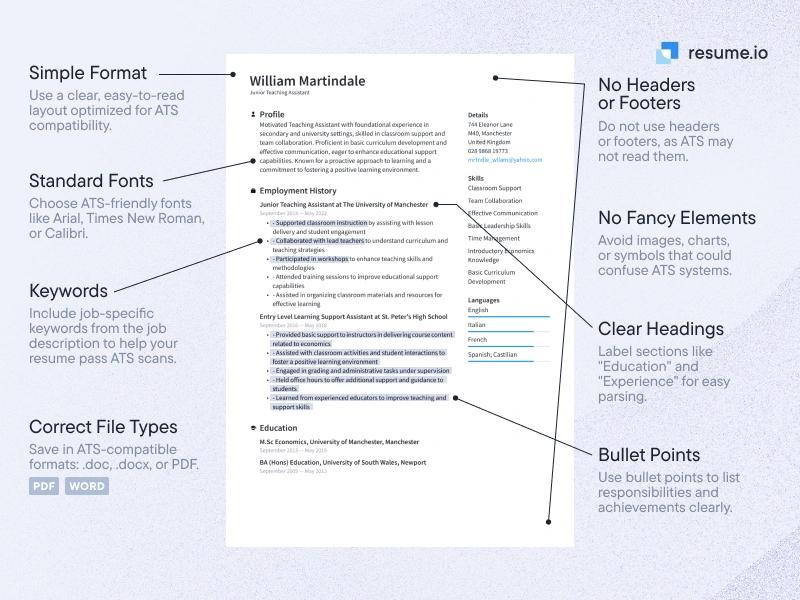
Image Source: Resume.io
Section headings are vital to check if your resume works well with ATS. Your resume might get a low ATS score despite perfect keywords and proper file formatting if the sections are poorly organized.
Standard headings ATS can read
ATS systems recognize specific section titles that match industry standards. Every ATS-compliant resume needs these fundamental sections:
- The resume header (with name and contact details)
- The resume summary (also called profile or personal statement)
- Employment history section
- Skills section
- Education section
ATS systems work best with chronological and hybrid formats. These formats show your information in a structure that applicant tracking systems easily process. Newer ATS systems give lower scores to functional resumes that leave out dates or detailed work history.
Avoiding creative or custom labels
Human readers might appreciate creativity, but ATS software gets confused by it. The software doesn't handle surprises well. The ATS software gets puzzled by creative section titles like "My Experience" or "What I Do" because it looks for standard labels.
Each major section needs its own clear heading. The ATS cannot properly categorize sections combined under one creative heading. Nursing credentials need separate "Education," "Licensure," and "Certifications" sections rather than one combined heading.
How to structure resume for ATS parsing
Your resume's organization substantially affects how well an ATS understands your information. A well-laid-out resume helps the software categorize each element correctly.
A blank line should appear before each section heading. This space helps the system spot new sections. Using Title Case for headings creates consistency and looks professional.
Your resume needs enough white space between sections. This spacing matters as much as keywords because it tells the ATS where sections start and end. All page margins should measure at least 0.75 inches.
Clean formatting plays a key role too. Earlier sections mentioned that ATS systems often cannot read headers or footers. A simple, straightforward layout works best – fancy designs might look great to human eyes but should be avoided.
You can check if your resume structure works with ATS by saving it as a plain text file. Most ATS systems will process your resume correctly if section headings stay clear and information keeps its proper order.
Fix Acronyms, Dates, and Abbreviations
Image Source: Feld Center - Boston University
Small details like acronyms and dates might look minor, but they can make or break your resume's ATS evaluation score. These elements often cause qualified candidates to get low scores.
Why acronyms and date formats matter
Applicant tracking systems have trouble understanding abbreviations and custom terminology without proper context. Your resume might miss critical keywords when you abbreviate terms without explanation because the ATS won't recognize them.
Date formats play a vital role—ATS systems calculate your employment duration based on them. The system might miscalculate your experience or fail to read it when dates appear in different formats. Job recruiters filter candidates based on years of experience, so incorrect date formats could eliminate you from the running.
Most ATS programs can't read unusual date formats like apostrophes in years (Jan '21) or single-digit months (1/2021 instead of 01/2021).
How to write dates and abbreviations for ATS
These date format best practices will help you pass ATS screening:
- Keep your date formatting consistent throughout your resume
- Pick either MM/YYYY format (03/2020) or Month Year format (March 2020 or Mar 2020)
- Include both month and year, not just years
- Add a space before and after hyphens in date ranges (2016 – 2019, not 2016-2019)
- Use the first three letters without periods when shortening months (Sep, not Sept.)
For acronyms and abbreviations:
- Start with the full term before using its acronym—"Enterprise Resource Planning (ERP)"
- You can use just the acronym after introducing it
- Your resume will show up in searches for both terms this way
These practices help ATS systems read your experience correctly and make your resume easier for humans to understand.
Tools to detect these issues
You can use these specialized tools to spot date format and abbreviation problems:
Jobscan's resume scanner flags inconsistent dates and abbreviation issues automatically. It checks if you've introduced acronyms properly and kept date structures consistent.
Resume Worded gives detailed feedback about date formatting and points out acronyms that appear without proper introduction.
The best ATS checkers have specific sections that look at these small but important details affecting your resume's readability.
These small fixes will boost your chances of getting a better ATS score and moving forward to human review in the hiring process.
Proofread and Recheck with ATS Checker
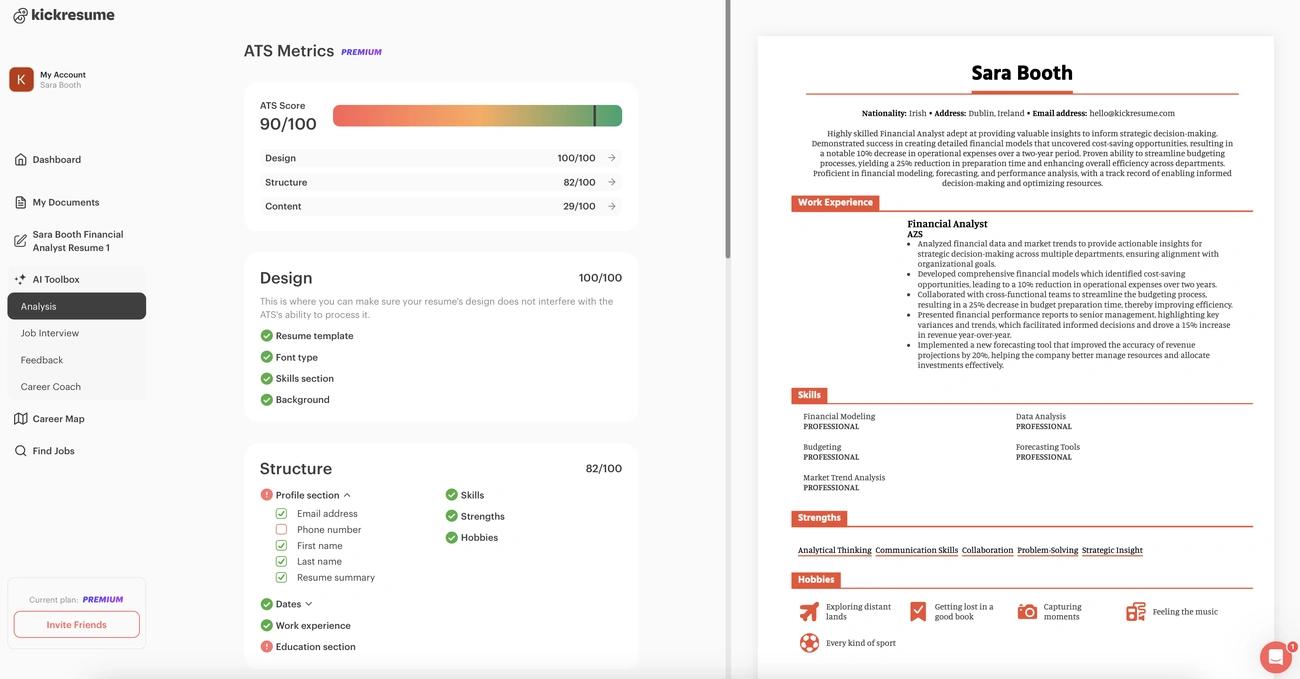
Image Source: Kickresume
The last step to optimize your ATS score needs careful proofreading - a step many job seekers rush through. Your perfect qualifications won't matter if typos and grammatical errors make them invisible to the system.
Why typos lower ATS score
Typos directly affect how ATS systems read your resume. A recent survey shows that 77% of hiring managers reject resumes with typos or grammatical errors right away. These mistakes do more than look unprofessional - they can stop the ATS from finding important keywords.
A small error like typing "JavaScrit" instead of "JavaScript" might not fool a human reader, but the ATS will see it as an unknown term. Typos also show you might miss details, which makes recruiters think you'll make bigger mistakes at work.
How to proofread for ATS optimization
ATS-friendly proofreading needs more than basic spell-checking:
- Tools like Grammarly or Microsoft Word's built-in checkers help spot errors
- Another person's review can catch mistakes you might miss
- Reading your resume out loud helps find awkward phrases
- Your formatting should stay consistent across pages
- Company names and industry terms need exact spelling
The word "résumé" itself can trip up some ATS systems because of its accent marks. Many experts suggest using "resume" without accents instead.
Rechecking your resume after edits
You should scan your document again after making your first round of ATS changes. This extra check becomes crucial when you've added keywords or changed formatting that might create new errors.
Tools like Jobscan, Resume Worded, or Kickresume are a great way to get final confirmation. These platforms run test scans like real ATS systems and show if your changes fixed old issues or created new ones.
Note that your resume usually goes through ATS screening even if you know someone at the company. A thorough proofread is your last chance to boost your ATS score and make sure hiring managers see your qualifications.
Comparison Table
| Method | Main Purpose | Key Tools/Methods | Common Issues | Recommended Solutions |
|---|---|---|---|---|
| Use an ATS Resume Scanner Tool | Assess resume compatibility with ATS systems | Jobscan, Career.io, TopResume, Enhancv, MyPerfectResume | Keyword matching, formatting problems, content quality | Test resume with multiple scanners to achieve 80% or higher score |
| Check Resume Formatting | Make sure ATS parses correctly | Plain text test, Format verification, Visual inspection | Complex layouts, headers/footers, unusual fonts, tables/graphics | Pick standard fonts (10–12pt), keep 1-inch margins, skip complex design elements |
| Analyze Keyword Match | Align resume content with job requirements | Jobscan, Resume Worded, SkillSyncer, JobScan Resume Matcher | Missing keywords, wrong terminology, poor keyword placement | Reach 75% match rate, add exact job titles, include multi-word phrases |
| Evaluate File Type and Structure | Confirm file compatibility | Word (.doc/.docx), PDF compatibility checks | Wrong file formats, unreadable PDFs, complex structures | Choose .doc/.docx unless specified, create PDFs directly from word processors |
| Review Section Headings | Structure content for ATS parsing | Standard section titles, Chronological/hybrid formats | Creative labels, merged sections, poor spacing | Stick to conventional headings, keep consistent spacing, maintain 0.75-inch margins |
| Fix Acronyms and Dates | Help systems recognize terms and experience | Date format standardization, Acronym introduction | Mixed date formats, unclear abbreviations | Stick to MM/YYYY format, define acronyms on first use |
| Proofread and Recheck | Catch all errors and verify changes | Grammar tools, ATS checkers, Manual review | Typos, formatting issues, technical terms | Apply multiple proofreading tools, get peer reviews, check after each update |
Conclusion
This piece shows why checking your resume's ATS score is vital in today's competitive job market. ATS filters prevent 75% of resumes from reaching human eyes, but these seven methods offer a detailed approach to help your application survive the digital screening process. Your chances of landing an interview increase by a lot when you use scanner tools, fix formatting issues and optimize keywords.
Note that small details make a difference. Your resume's ATS compatibility improves with consistent date formats, properly introduced acronyms, and error-free content. It also helps when you use the right file type and section headings that let these systems parse your qualifications correctly.
You need to combine multiple methods to get the best results. Start by running your resume through an ATS scanner to spot issues. Fix formatting problems, keyword gaps, and structural elements before you proofread everything. Your applicants should never get lost in the system.
Ready to streamline your hiring with SkillSauce ATS?
Experience smarter candidate tracking, faster screening, and automated workflows with our intelligent ATS solution.
The effort you put into these strategies pays off well. The most impressive qualifications mean nothing if your resume gets filtered out before reaching a hiring manager. These proven techniques will boost your resume's ATS score and help you land that dream job.
Key Takeaways
Understanding and optimizing your resume's ATS compatibility is crucial for job search success in today's digital hiring landscape.
• 75% of resumes never reach human recruiters due to ATS filtering, making compatibility checks essential before applying to any position.
• Use multiple ATS scanner tools like Jobscan, Career.io, and Resume Worded to achieve an 80% or higher compatibility score.
• Prioritize simple formatting over design - avoid tables, graphics, headers/footers, and use standard fonts (10-12pt) with .docx format.
• Target 75% keyword match rate by analyzing job descriptions and incorporating exact terms, job titles, and multi-word phrases naturally.
• Maintain consistent formatting standards including MM/YYYY date formats, standard section headings, and proper acronym introductions.
• Proofread thoroughly after each edit since even minor typos can prevent ATS systems from recognizing critical keywords and qualifications.
By systematically applying these methods, you'll transform your resume from an ATS liability into a powerful tool that successfully navigates automated screening and reaches hiring managers who can appreciate your qualifications.